Python - Data Types and Data Structures

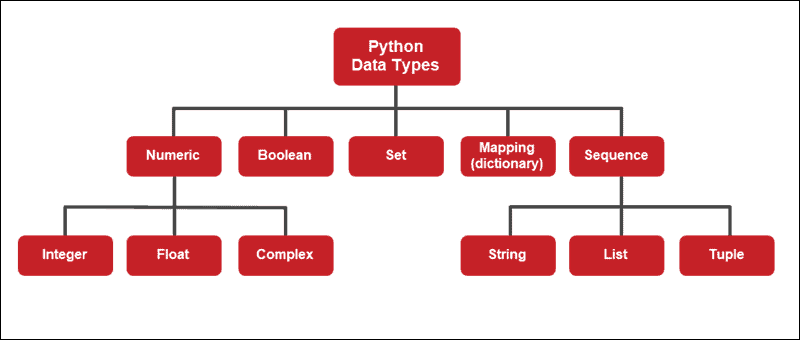
🚩Data Types:
Data type is a classification that specifies which type of value a variable can hold or which operations can be performed on it. Data types are an essential concept in programming because they help ensure data integrity, memory allocation, and the accuracy of operations performed on variables.
🚩Data Structures:
Data Structures are a way of organizing data so that it can be accessed more efficiently depending upon the situation. Data Structures are fundamentals of any programming language around which a program is built. Python helps to learn the fundamental of these data structures in a simpler way as compared to other programming languages.
🚩Lists Data Type:
Lists are just like arrays, declared in other languages which is an ordered collection of data. It is very flexible as the items in a list do not need to be of the same type.
Lists in Python can be created by just placing the sequence inside the square brackets[].


🚩Tuple Data Type
Just like a list, a tuple is also an ordered collection of Python objects. The only difference between a tuple and a list is that tuples are immutable i.e. tuples cannot be modified after it is created. It is represented by a tuple class.


🚩Dictionary Data Type:
Dictionary is a collection of keys values, used to store data values like a map, which, unlike other data types which hold only a single value as an element.
Dictionary holds key:value pair. Key-Value is provided in the dictionary to make it more optimized.
Note – Dictionary keys are case sensitive, the same name but different cases of Key will be treated distinctly.


Task 1: Give the Difference between List, Tuple and Set. Do hands-on and put screenshots as per your understanding.
List:
Mutable: Lists are mutable, which means you can change, add, or remove elements after the list is created.
Ordered: Lists maintain the order of elements, meaning the elements are stored in the order they were added.
Syntax: Enclosed in square brackets
[ ].Example:
  pythonCopy codemy_list = [1, 2, 3, 4]
  my_list[0] = 0  # Modifying an element
  my_list.append(5)  # Adding an element
Tuple:
Immutable: Tuples are immutable, which means once you create a tuple, you cannot change its elements. You can, however, create a new tuple with modified values.
Ordered: Tuples, like lists, maintain the order of elements.
Syntax: Enclosed in parentheses
( )or without parentheses.Example:
  pythonCopy codemy_tuple = (1, 2, 3, 4)
  # You can't modify my_tuple directly, but you can create a new one
  new_tuple = my_tuple + (5,)
Set:
Mutable (but not for elements): Sets themselves are mutable (you can add and remove elements), but the elements contained within a set must be immutable (e.g., numbers, strings, tuples).
Unordered: Sets do not maintain any specific order of elements, and they do not allow duplicate values.
Syntax: Enclosed in curly braces
{ }or created using theset()constructor.Example:
  pythonCopy codemy_set = {1, 2, 3, 4}
  my_set.add(5)  # Adding an element
Here's a summary of their main differences:
Lists are mutable and ordered.
Tuples are immutable and ordered.
Sets are mutable (for adding/removing elements) and unordered (no duplicates).
The choice between them depends on your specific use case. Use lists when you need a collection of elements that can change, tuples for collections of values that should not change, and sets when you need to work with unique, unordered elements.
Task 2: Create below Dictionary and use Dictionary methods to print your favourite tool just by using the keys of the Dictionary.


Task 3: Create a List of cloud service providers eg.
cloud_providers = ["AWS","GCP","Azure"]
Write a program to add Digital Ocean to the list of cloud_providers and sort the list in alphabetical order.


😀Thank you for reading!
Feel free to give any feedback📜 or suggestions.