Terraform providers and their significance

Terraform providers and their significance in managing resources across various cloud platforms.
Terraform creates and manages resources on cloud platforms and other services through their application programming interfaces (APIs). Providers enable Terraform to work with virtually any platform or service with an accessible API.
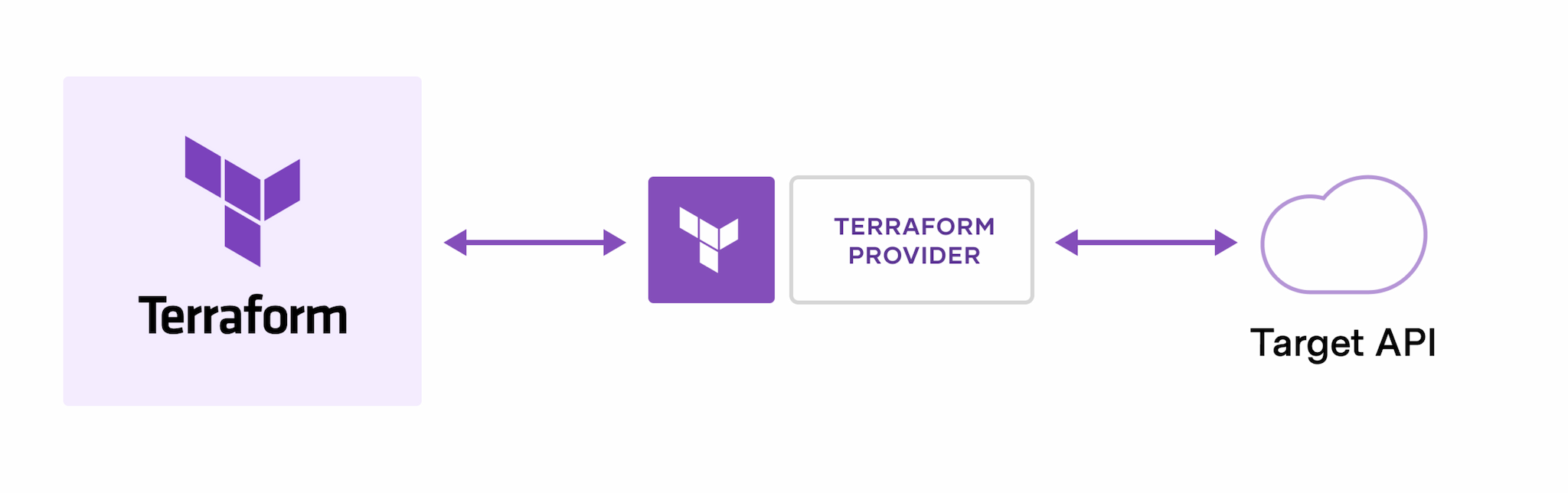
Significance of Providers:
Cross-Platform and Cross-Service Compatability: Providers enable Terraform to work seamlessly across various cloud platforms and infrastructure services. This allows users to manage resources on AWS, Azure, Google Cloud, and other providers using a consistent and unified configuration management.
State Management: Providers are responsible for managing the state of resources. The state file keeps track of the current state of infrastructure, and providers ensure that actual state of resources matches the desired state specified in the configuration. This helps in maintaining the integrity and consistency of the infrastructure.
Versioning and Compatibility: Providers have versioning separate from the Terraform core. This ensures that users can specify which version of a provider they want to use, providing stability and allowing for consistent behavior across different environments.
Compare the features and supported resources for each cloud platform's Terraform provider.
AWS (Amazon Web Services):
Features:
Comprehensive coverage of AWS services, including compute, storage, databases, networking, security, etc.
Support for the latest AWS features and updates.
Integration with AWS Identity and Access Management (IAM) for access control.
Supported Resources:
- EC2 instances, S3 buckets, RDS databases, VPCs, IAM roles, Lambda functions, etc.
Azure:
Features:
Support for a wide range of Azure services and resources.
Integration with Azure Active Directory for authentication and authorization.
Azure Resource Manager (ARM) template compatibility.
Supported Resources:
- Virtual machines, Azure Blob Storage, SQL databases, Virtual Networks, App Services, etc.
Google Cloud Platform (GCP):
Features:
Support for various GCP services and features.
Integration with Google Cloud Identity and Access Management (IAM).
Compatibility with Google Cloud Deployment Manager.
Supported Resources:
- Compute Engine instances, Cloud Storage, Cloud SQL, Virtual Private Cloud (VPC), Pub/Sub, etc.
1. Provider Configuration:
Syntax:
  provider "provider_name" {
    // Configuration settings
  }
Example for AWS:
  provider "aws" {
    region = "us-west-2"
  }
2. Authentication Mechanisms:
1. Static Credentials:
Description:
- Hardcoded access and secret keys in the Terraform configuration.
Example (AWS):
  provider "aws" {
    region = "us-west-2"
    access_key = "your-access-key"
    secret_key = "your-secret-key"
  }
2. Environment Variables:
Description:
- Credentials provided via environment variables.
Example (AWS):
  provider "aws" {
    region = "us-west-2"
    shared_credentials_file = "/path/to/credentials/file"
  }
3. Shared Credentials File:
Description:
- Path to a shared credentials file containing access and secret keys.
Example (AWS):
  provider "aws" {
    region = "us-west-2"
    shared_credentials_file = "/path/to/credentials/file"
  }
4. IAM Roles (Assume Role):
Description:
- Assume a role to get temporary credentials.
Example (AWS):
  provider "aws" {
    region = "us-west-2"
    assume_role {
      role_arn = "arn:aws:iam::account_id:role/role_name"
    }
  }
5. Instance Metadata (IAM Role for EC2 Instances):
Description:
- EC2 instances can use their IAM role for authentication.
Example (AWS):
  provider "aws" {
    region = "us-west-2"
  }
6. Service Principal (Azure):
Description:
- Authenticating to Azure using a service principal.
Example (Azure):
  provider "azurerm" {
    features = {}
    client_id       = "your-client-id"
    client_secret   = "your-client-secret"
    subscription_id = "your-subscription-id"
    tenant_id       = "your-tenant-id"
  }
7. Service Account JSON File (Google Cloud):
Description:
- JSON file containing service account key details.
Example (Google Cloud):
  provider "google" {
    credentials = file("/path/to/service-account-file.json")
    project     = "your-project-id"
    region      = "us-central1"
  }
3. Authentication Best Practices:
Use environment variables or external files for sensitive information.
Leverage provider-specific authentication methods (e.g., assume roles for AWS).
Regularly rotate and secure credentials.
4. Dynamic Configuration with Variables:
- Use variables to make configurations dynamic and reusable.
5. Remote Backends:
- For more secure collaboration, consider using remote backends like AWS S3 or HashiCorp Terraform Cloud, where credentials might be stored securely.
Create, authenticate and deploy a simple resource using the chosen provider. For example, if using AWS, you could provision a Virtual Private Cloud (VPC), Subnet Group, Route Table, Internet Gateway, or a Virtual Machine.
Configure the credentials by aws configure or by using export, then follow the below steps as shown in the screenshots.
The main.tf file consists of the following HCL script.


