😇Terraform Modules

Terraform Modules: Modules are containers for multiple resources that are used together. A module consists of a collection of .tf and/or .tf.json files kept together in a directory.
Modules are the main way to package and reuse resource configurations with Terraform.
Root Module: Every Terraform configuration has at least one module, known as its root module, which consists of the resources defined in the .tf files in the main working directory.
Child Module: A Terraform module (usually the root module of a configuration) can call other modules to include their resources into the configuration. A module that has been called by another module is often referred to as a child module.
Published Modules: In addition to modules from the local filesystem, Terraform can load modules from a public or private registry. This makes it possible to publish modules for others to use, and to use modules that others have published.
💎Need of Modules in Terraform:
Modularity and Reusability: Modules allow you to break down your infrastructure code into smaller, manageable components. You can create modules for common infrastructure patterns or components, such as a virtual machine, a database cluster, or a network configuration. Once created, these modules can be reused across different parts of your infrastructure or in different projects.
Abstraction: Modules provide an abstraction layer that hides the complexity of the underlying infrastructure details. This abstraction allows users to interact with modules using a simplified interface, making it easier to provision and manage infrastructure resources.
Code Organization: Modules help keep your Terraform codebase organized and maintainable. By grouping related resources and their configurations into modules, you can create a clear structure for your code, making it easier to understand and maintain as your infrastructure grows.
Versioning and Lifecycle Management: Modules can be versioned, making it possible to track changes and updates to infrastructure components over time. This is especially important when multiple teams or individuals are working on the same project, as it helps ensure consistency and avoids conflicts.
Parameterization: Modules can be parameterized, allowing you to customize their behavior by passing input variables. This flexibility enables you to reuse modules with different configurations, adapting them to specific requirements without duplicating code.
Testing and Validation: Modules can be tested independently, which simplifies the process of ensuring that specific infrastructure components work as expected before they are used in a larger infrastructure deployment.
Collaboration: Modules facilitate collaboration between team members or even across different organizations. Modules can be shared and reused in various projects, fostering best practices and standardization.
Security and Compliance: Modules can help enforce security and compliance policies by encapsulating specific configurations and ensuring that they are consistently applied across different parts of your infrastructure.
Benefits of using Modules in Terraform:
Code Reduction: By using modules, you can significantly reduce the amount of code you need to write and maintain. Instead of repeating the same code, you can create a module and reference it multiple times, passing different parameters.
Consistency: Modules help ensure consistency across your infrastructure. By standardizing configurations, you can mitigate the risk of configuration drift and ensure that all your environments are set up consistently.
Simplified Management: Modules encapsulate complex components into a single unit, simplifying the process of managing your infrastructure. Even with complex, multi-layer architectures, modules can help to keep your configurations tidy and manageable.
Create/Define a module in Terraform to encapsulate reusable infrastructure configuration in a modular and scalable manner.
e.g. EC2 in AWS.
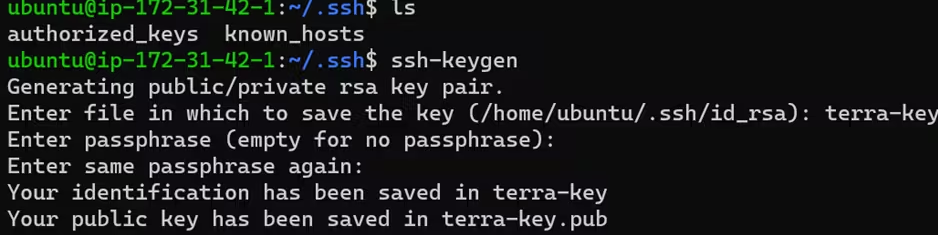
Create a key pair by using ssh-keygen

Provide appropriate terraform script for creating EC2 instance along with VPC.
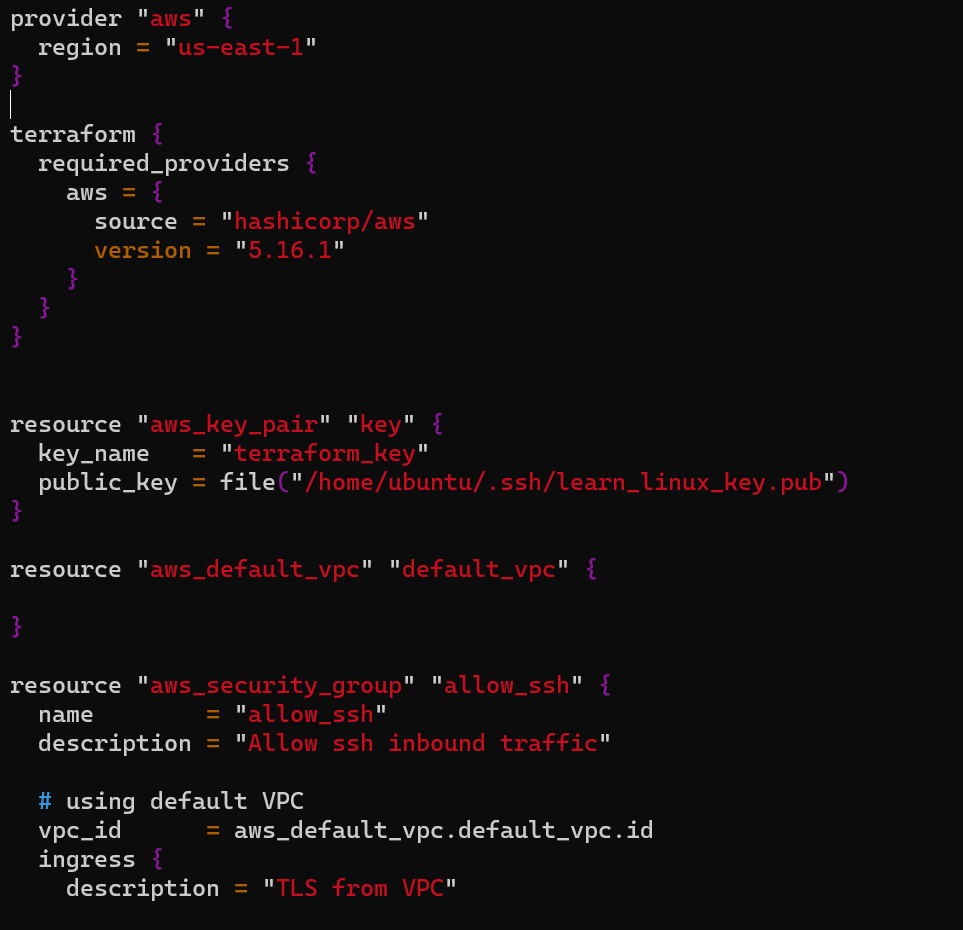
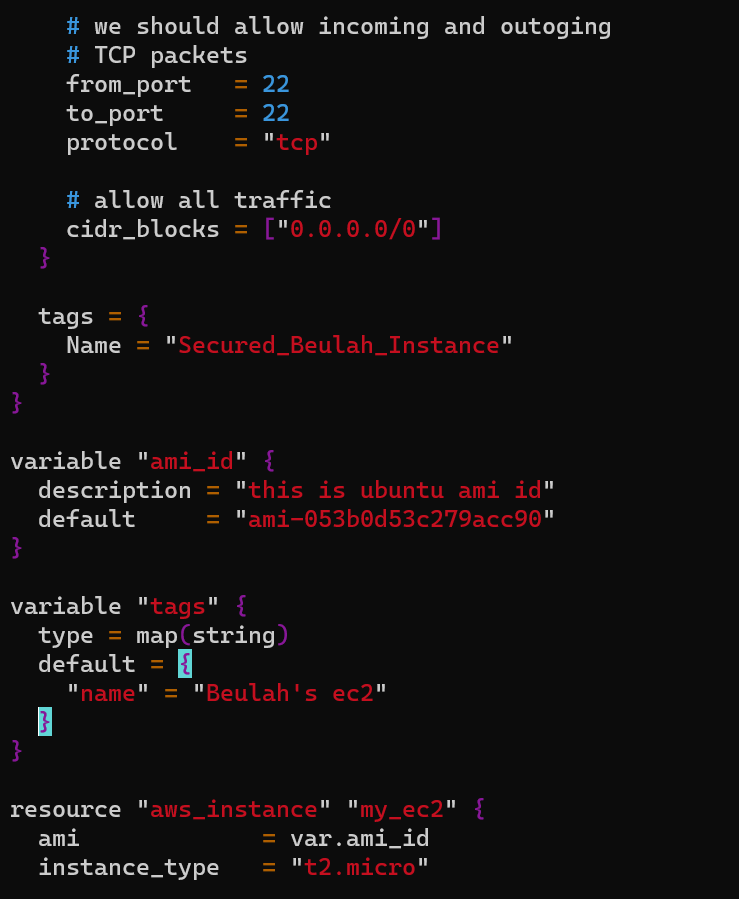
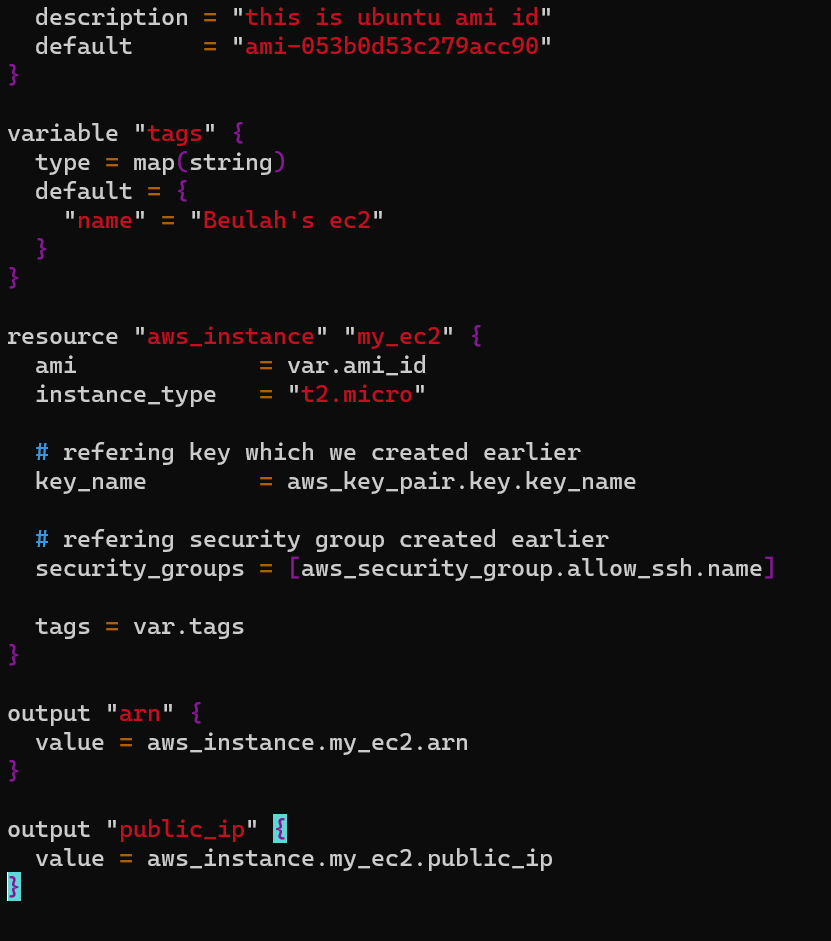
terraform init initializes as follows:
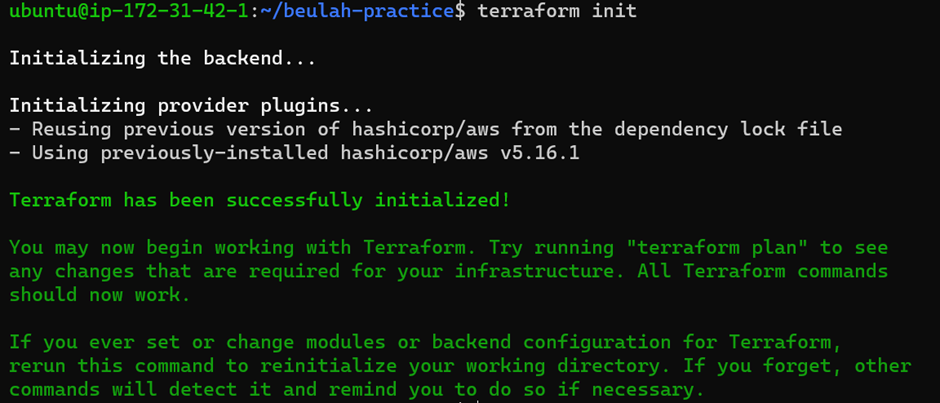
terraform validate will validate your terraform script

terraform plan execution shows as follows:
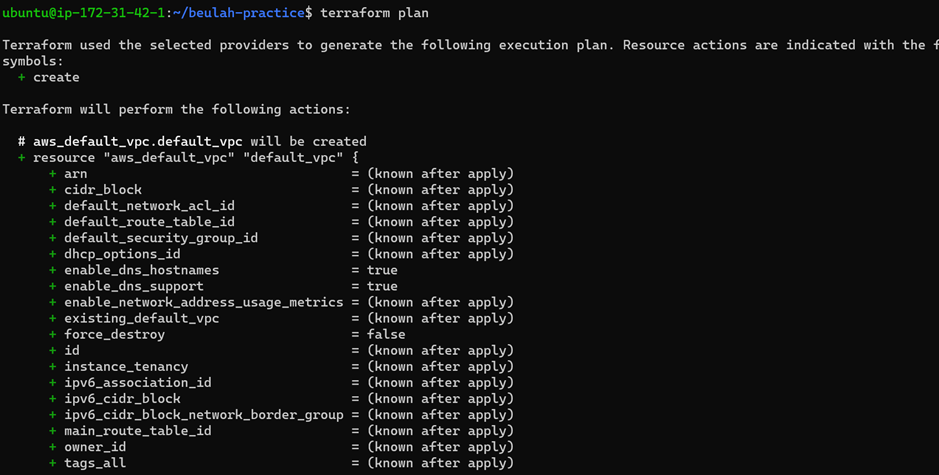
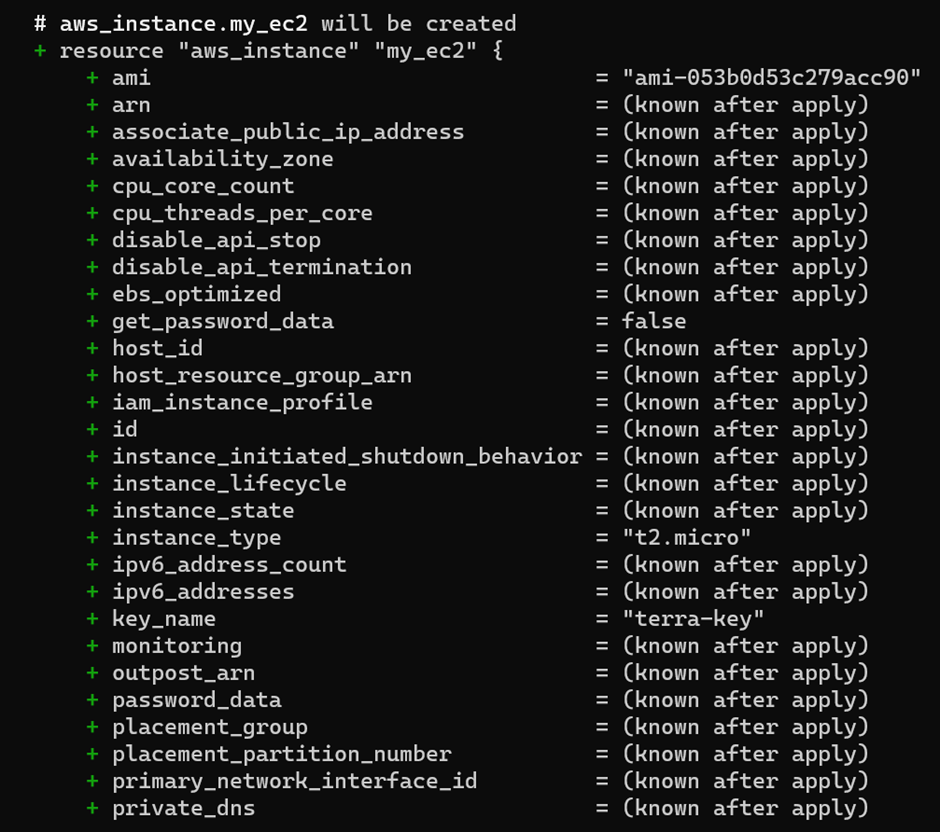
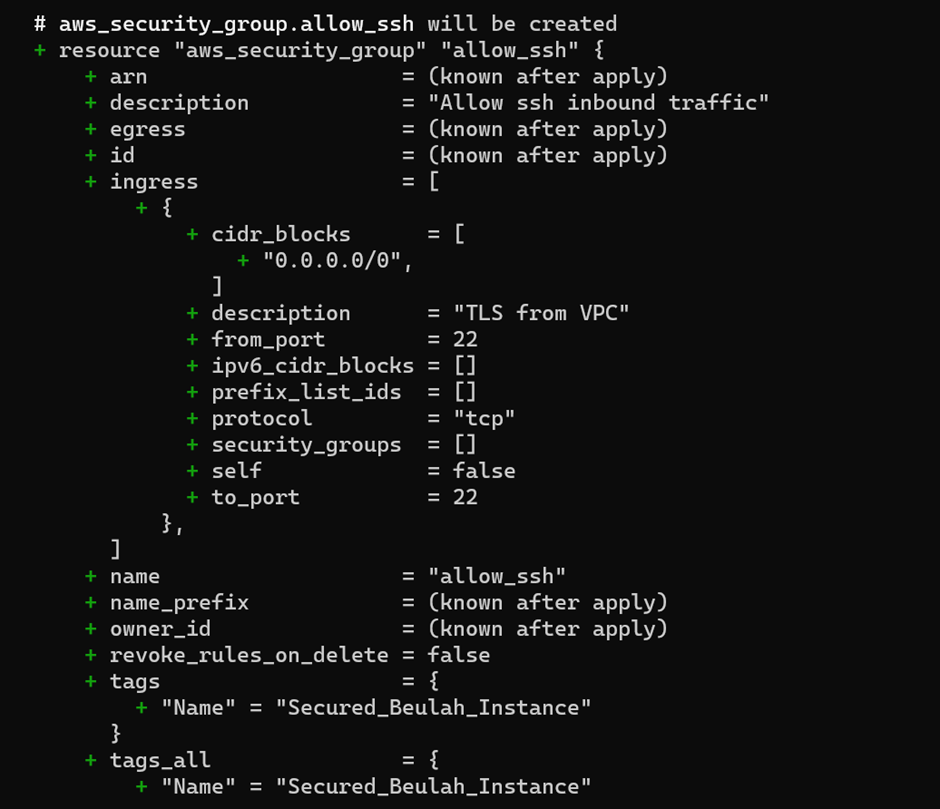
terraform apply will create the AWS EC2 instance along with VPC.
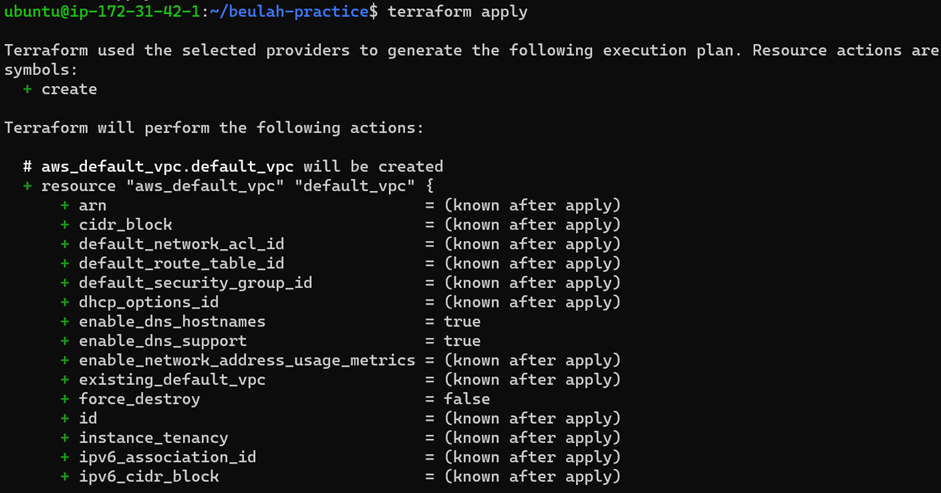
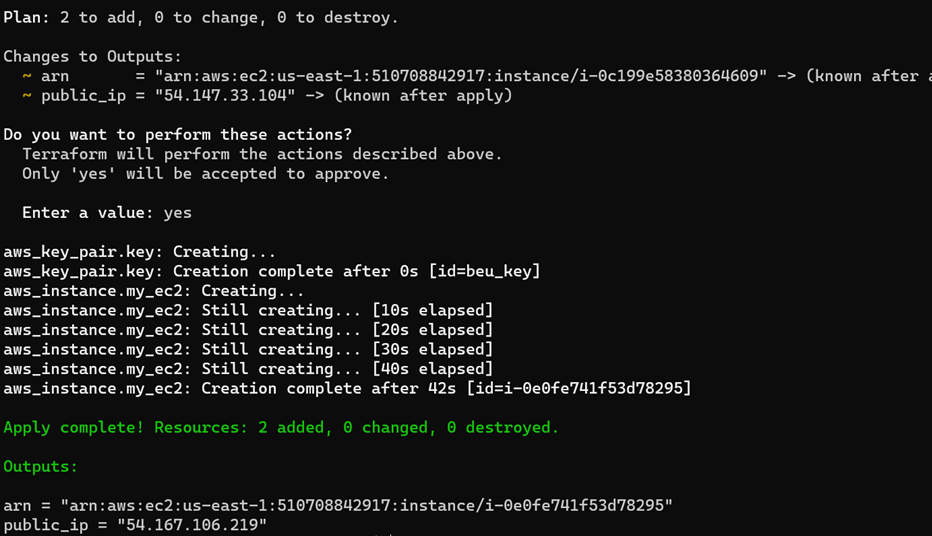
Modular Composition:
Modular composition refers to the practice of combining and assembling Terraform modules to create more complex infrastructure configurations. This concept is essential for building scalable and maintainable infrastructure as code (IaC) projects. Here's how modular composition works:
Reuse of Modules: The core idea is to create individual Terraform modules for specific infrastructure components or configurations. For example, you might have modules for a virtual machine, a database server, a load balancer, and a network subnet.
Assembly: To create a larger infrastructure configuration, you assemble these smaller modules together in a hierarchical structure. You can use one module as a building block within another module.
Input Variables: Modules accept input variables, allowing you to customize their behavior. When assembling modules, you can pass values for these input variables to configure the components according to your requirements.
Hierarchical Structure: You can create a hierarchical structure of modules where higher-level modules use lower-level modules as their constituent parts. For example, you might have a "web application" module that includes a "database" module and a "load balancer" module.
Parameterization: Modular composition enables you to parameterize your infrastructure. This means that you can reuse the same module with different input values to create variations of the same component. For instance, you might use the same "web server" module to create multiple web servers with different configurations.
Composition Flexibility: You can compose modules in various ways to suit your infrastructure requirements. This flexibility allows you to design infrastructure configurations that are both modular and tailored to your specific use cases.
Abstraction Layers: As you compose modules into larger configurations, you create abstraction layers that simplify the provisioning process. This abstraction hides the underlying complexity of individual components, making your code more readable and maintainable.
Module Versioning:
Module versioning is a crucial aspect of managing Terraform modules over time. It helps ensure that your infrastructure code remains stable and consistent, even as you update and evolve your modules. Here's how module versioning works:
Semantic Versioning: Terraform modules typically use semantic versioning (SemVer) to indicate their version numbers. SemVer consists of three parts: major, minor, and patch versions (e.g., 1.2.3). Each part has a specific meaning:
Major version (X.y.z): Indicates backward-incompatible changes.
Minor version (x.Y.z): Indicates backward-compatible new features or enhancements.
Patch version (x.y.Z): Indicates backward-compatible bug fixes or patches.
Module Sources: When you use a module in your Terraform configuration, you specify the source location of the module, which can be a local directory, a Git repository, or a module registry (such as the Terraform Registry). You can also specify the version constraint for the module.
Version Constraints: You can set version constraints to control which module versions are acceptable for your configuration. Common constraints include using an exact version (e.g., "1.2.3"), allowing any minor version (e.g., "1.2"), or using the latest version (e.g., ">= 1.0").
Module Updates: When you want to update a module to a new version, you can adjust the version constraint in your configuration. Terraform will then download and use the specified version of the module.
Lock Files: Terraform generates a "terraform.lock.hcl" file to record the specific versions of modules used in your configuration. This file helps ensure that collaborators and automated pipelines consistently use the same module versions.
Backward Compatibility: Care should be taken when upgrading to a new major version of a module, as it may introduce breaking changes. Always review module documentation and release notes to understand the impact of version upgrades.
What are the ways to lock Terraform module versions? Explain with code snippets.
Locking Terraform module versions is crucial for ensuring the stability and predictability of your infrastructure deployments. It prevents unintended changes to module versions that might lead to unexpected issues. Terraform provides several ways to lock module versions:
Terraform Configuration Files (
required_providersandsource):You can specify the required provider and module versions directly in your Terraform configuration files using the
required_providersandsourceblocks. Here's how you can lock a provider and module version using these blocks:provider "aws" { region = "us-west-2" } module "example" { source = "terraform.example.com/instance/aws" version = "2.1.0" # Locking to a specific version of the module }In the above example, the
sourceblock locks the module to version 2.1.0.Terraform CLI Configuration (CLI Configuration Files):
You can lock module versions globally or on a per-directory basis using CLI configuration files. To lock module versions for a specific directory, create a
versions.tffile:// versions.tf terraform { required_version = ">= 0.15" required_providers { aws = { source = "hashicorp/aws" version = "3.44.0" # Locking to a specific provider version } } } module "example" { source = "terraform.example.com/instance/aws" }In this example, the
versions.tffile locks the required Terraform version to at least 0.15 and the AWS provider to version 3.44.0.Terraform Lock Files (
terraform.lock.hcl):Terraform generates lock files (e.g.,
terraform.lock.hcl) to record the exact versions of providers and modules used in your configuration. Lock files are typically generated after you runterraform initwith your configuration.The lock file records the specific versions of providers and modules that were downloaded during the initialization process. Lock files ensure that subsequent runs of
terraform initwill use the same versions. You don't need to manually edit lock files; Terraform manages them for you.Here's an example of a simplified
terraform.lock.hcl:# Automatically generated by Terraform # ... providers = { aws = { source = "hashicorp/aws" version = "3.44.0" } } modules = { example = { source = "terraform.example.com/instance/aws" version = "2.1.0" } }Terraform Registry: Registry Mirror:
If you're using the Terraform Registry (public or a private registry), you can lock module versions in your configuration files by specifying the exact version in the
sourceattribute:module "example" { source = "terraform.example.com/instance/aws@2.1.0" }This explicitly locks the module to version 2.1.0 from the registry.
By using one or more of these methods, you can ensure that your Terraform configurations use specific versions of providers and modules, promoting consistency and predictability in your infrastructure deployments.